
← Back to projects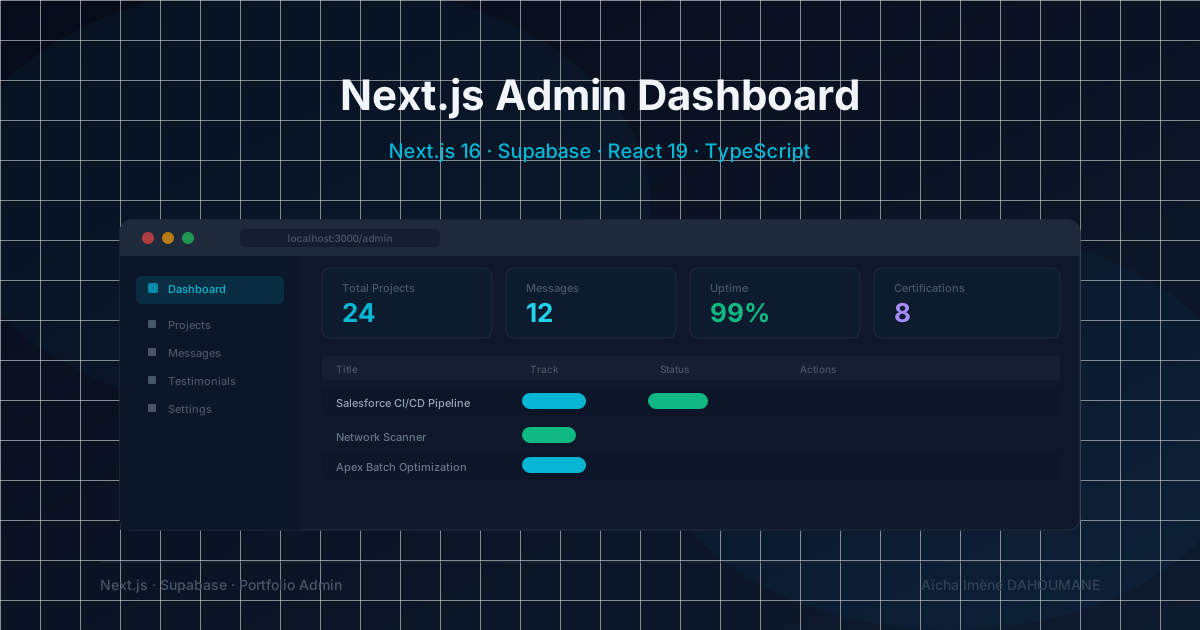

PERSONAL PROJECT
Admin Dashboard — Next.js 16 + Supabase
A secure /admin route built with HTTP Basic Auth, Supabase service_role, and zero extra dependencies.
Why I built this
Every data-driven portfolio eventually needs a way to monitor its own data without opening the Supabase dashboard every time. I wanted to see my contact messages, project counts, and certification state at a glance — but building a full auth system felt like massive overkill for a personal tool.
The challenge: how do you protect an internal route in Next.js 16 with zero new dependencies, while still being able to read tables that are locked behind Row Level Security for anonymous users?
Technical constraints I had to solve
- Next.js 16 replaces middleware.ts with proxy.ts — the same file handles i18n routing for next-intl. Admin auth had to be injected without breaking locale prefixes.
- Edge runtime has no Buffer: the standard Node.js approach (Buffer.from(b64, 'base64').toString()) fails silently. I had to use atob() instead.
- The messages table is SELECT-blocked for the anon role by RLS policy. Reading it requires a service_role client — which must never leave the server.
- The admin layout must NOT include <html>/<body> — the root app/layout.tsx already provides those. Duplicating them triggers a React hydration mismatch.
- The /admin path must be excluded from next-intl's locale-prefixing logic, otherwise the proxy tries to redirect /admin to /en/admin.
How I built it
- 1Step 1 — Admin Supabase clientCreated lib/supabase/admin.ts using the SUPABASE_SERVICE_ROLE_KEY env var (no NEXT_PUBLIC_ prefix — server only). This client bypasses all RLS policies and can SELECT from the messages table that the public anon client cannot access.
- 2Step 2 — HTTP Basic Auth in proxy.tsAdded an adminAuth() guard at the top of the proxy() function. If the pathname starts with /admin, it checks the Authorization header before passing to the next-intl handler. Used atob() for Edge-compatible base64 decoding. ADMIN_USERNAME and ADMIN_PASSWORD are set in .env.local (server-only).
- 3Step 3 — Isolated admin layoutCreated app/admin/layout.tsx returning a <div> wrapper (not <html>/<body>) with a dark Slate theme, a minimal header, and robots: index: false metadata. The layout sits entirely outside the [locale] routing tree.
- 4Step 4 — Dashboard Server Componentapp/admin/page.tsx fetches all four tables in parallel using Promise.all(). Stat cards, a full project table (status / track / featured / date), the 20 most recent contact messages with clickable mailto links, a certifications table, and testimonial counters. Zero client JavaScript.
Core: Edge-compatible Basic Auth (proxy.ts)
function adminAuth(request: NextRequest): NextResponse | null {
  const expectedUser = process.env.ADMIN_USERNAME;
  const expectedPass = process.env.ADMIN_PASSWORD;

  if (!expectedUser || !expectedPass) {
    return new NextResponse("Admin not configured.", { status: 503 });
  }

  const authHeader = request.headers.get("authorization");
  if (authHeader?.startsWith("Basic ")) {
    try {
      const decoded = atob(authHeader.slice(6)); // Edge-safe — no Buffer
      const colonIdx = decoded.indexOf(":");
      if (colonIdx !== -1) {
        const user = decoded.slice(0, colonIdx);
        const pass = decoded.slice(colonIdx + 1);
        if (user === expectedUser && pass === expectedPass) {
          return null; // ✅ authorized
        }
      }
    } catch {
      // malformed base64 — reject
    }
  }

  return new NextResponse("Authentication required.", {
    status: 401,
    headers: { "WWW-Authenticate": 'Basic realm="Admin", charset="UTF-8"' },
  });
}
What this project demonstrates
0
New npm packages added
HTTP Basic Auth via proxy.ts + env vars only
4
Tables monitored
projects · certifications · messages · testimonials
0 KB
Client JavaScript
100% Server Components — no hydration overhead
~25
Lines of auth code
In proxy.ts — no login page, no session, no JWT
Key learnings
- Edge runtime is more restrictive than Node.js: always check which APIs are available (Buffer, crypto, fs…) before reaching for them.
- next-intl and custom proxy logic can coexist cleanly if you guard the admin path before calling the intl handler.
- Server Components are the right default for internal dashboards — no state, no effects, no bundles sent to the browser.
- RLS is your safety net, not a replacement for server-side secrets: even with service_role, the key never leaves the server.