
← Back to projects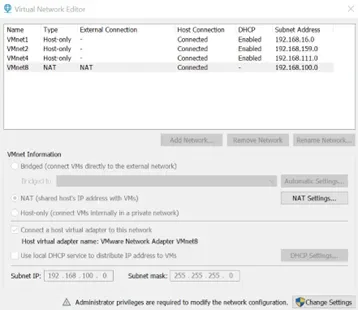

PERSONAL PROJECT
Securing Internet Access with pfSense & Squid
pfSense 2.6.0 · Squid · SquidGuard · LightSquid · VMware Workstation 17
Context
Building on the virtualized lab (AD DS / DNS / DHCP / WDS on Windows Server 2022), I added a pfSense 2.6.0 firewall VM as the network gateway. Goal: secure outbound internet access for all LAN machines (192.168.100.0/24), filter web traffic through a Squid transparent proxy, and enforce access policies — replicating real-world enterprise perimeter security.
Lab Architecture
- Hypervisor: VMware Workstation Pro 17
- pfSense 2.6.0 VM: FreeBSD 12 64-bit, 10 GB HDD, 2 GB RAM — LAN/WAN gateway
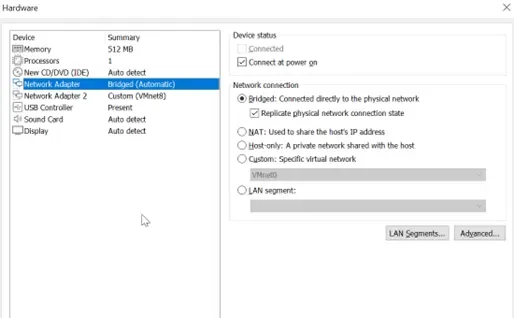
- WAN (em0): Bridged to host 4G USB dongle — DHCP — 192.168.1.110/24
- LAN (em1): VMnet8 (NAT) — 192.168.100.220/24 (pfSense gateway)
- DCAD22: 192.168.100.250 — AD DS, DNS, DHCP, WDS
- SRVSAMBA: 192.168.100.130 — Samba shares | Clients: 192.168.100.21/22
Configurations Deployed
- IP aliases: SRV group (servers) and Client group (workstations) for targeted rules
- LAN rules: DNS (UDP 53) and ICMP allowed from SRV — REFUS SRV VERS INTERNET rule placed above allow-all
- Squid transparent proxy on LAN interface (port 3128) with SSL inspection enabled
- Internal CA Pfsense-CA (RSA 2048, SHA-256, 10 years) for SSL bump on outbound HTTPS
- SquidGuard: URL category filtering with blacklists
- LightSquid: per-client web traffic reporting dashboard
Stack & Technologies
- pfSense 2.6.0 — Firewall, NAT, routing (FreeBSD-based)
- Squid — Transparent proxy with SSL inspection (port 3128)
- SquidGuard — URL category filtering (blacklists)
- LightSquid — Per-user web usage reporting dashboard
- VMware Workstation Pro 17 — Type 2 hypervisor
- PKI / pfSense CA Manager — Internal certificate authority for HTTPS inspection
Setup Phases
- 1pfSense installationFreeBSD 12 64-bit VM created in VMware (10 GB, 2 GB RAM), 2 NICs: Bridged (4G WAN) + VMnet8 (LAN). pfSense 2.6.0 ISO installed. Console confirms WAN em0 (192.168.1.110) and LAN em1 (192.168.100.220).
- 2Aliases & firewall rulesSRV (servers) and Client (workstations) IP aliases created. LAN rules: DNS + ICMP allowed from SRV, then REFUS SRV VERS INTERNET placed above allow-all — servers blocked except DNS/ICMP.
- 3Squid proxy & SquidGuard3 packages installed: squid, squidGuard, LightSquid. Squid configured as transparent proxy port 3128 with SSL bump. SquidGuard set up with URL category blacklists. LightSquid enabled for traffic reports.
- 4Certificate authorityPfsense-CA generated (RSA 2048, SHA-256, 10 years, C=FR). Used by Squid to re-sign intercepted HTTPS connections — must be imported as a trusted CA on all client machines.
Outcomes
- Gateway
- pfSense operational(All LAN traffic routed via 4G WAN)
- Access control
- Servers internet-isolated(DNS + ICMP exceptions only)
- Web filtering
- Squid + SquidGuard active(URL categories blocked)
- HTTPS inspection
- SSL bump deployed(Internal CA for encrypted traffic)
- Reporting
- LightSquid active(Per-client web stats available)
- Skills
- pfSense, firewall, proxy, PKI(Complete personal lab)
Screenshots