
← Back to projects

FIELD PRACTICE
Workstation Setup: Windows 10 Install & Software Deployment
Windows 10 Pro · Ninite · Office 2016 · BIOS · Driver setup
Context
Training exercise at Greta du Val d Oise under trainer Miguel MI-POUDOU. A client brought in an extremely slow HP laptop with no data to recover. Mission: full workstation rebuild — clean OS reinstall, driver validation, batch software deployment, and final configuration before client handover.
Scope & Objectives
- Reinstall Windows 10 Pro 64-bit from a bootable USB drive
- Validate all drivers (audio, network, GPU) after installation
- Rapidly deploy the full required software suite (7+ applications)
- Configure the workstation for immediate client handover (shortcuts, backup, antivirus)
- Intervene without any data loss — blank machine, no recovery needed
Solution & Deliverables
- USB boot configured via BIOS, Windows 10 Pro 64-bit installed with trainer-provided OEM key
- OOBE completed: region France, user account created, Cortana, Microsoft Hello, geolocation
- All drivers validated in Device Manager — network, audio, GPU
- 7+ applications deployed in one unattended pass via Ninite.com — no toolbars, no clicks
- Office 2016 Professional Plus installed and activated simultaneously
- Desktop shortcuts, wallpaper, and Windows Backup configured — workstation validated by trainer
Stack & Technologies
- Windows 10 Pro 64-bit — OS reinstalled from ISO on USB drive
- BIOS/UEFI — boot order configuration
- Device Manager — post-installation driver validation
- Ninite.com — batch app deployment without interaction (Chrome, Firefox, 7-Zip, Zoom, LibreOffice, TeamViewer, MalwareBytes)
- Office 2016 Professional Plus — office productivity suite
- Windows Backup — post-installation backup configuration
Procedure
- 1BIOS & USB bootEntered BIOS (F2/DEL), changed boot order to place USB key (Windows 10 Pro ISO) first. Saved with F10 and rebooted.
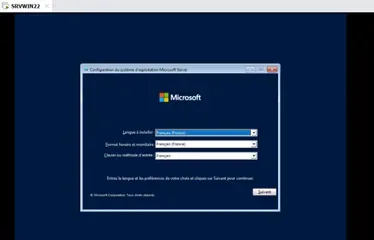
- 2Windows 10 Pro installationFrench, Custom installation, Windows 10 Pro 64-bit with OEM key. License accepted, user account created, OOBE completed (region France, Cortana, Microsoft Hello).
- 3Driver verificationDevice Manager opened — audio, network (Ethernet + Wi-Fi) and GPU drivers validated. Network connected, antivirus installed.
- 4Batch deployment via NiniteNinite.com used to install Chrome, Firefox, 7-Zip, Zoom, Skype, LibreOffice, TeamViewer 15 and MalwareBytes in one unattended run. Office 2016 Pro Plus installed simultaneously.
- 5FinalizationDesktop shortcuts configured, wallpaper applied, Windows Backup enabled. Workstation handed over to client after trainer validation.
Outcomes
- OS
- Windows 10 Pro 64-bit(Clean install — all drivers validated)
- Software
- 7+ applications(Deployed via Ninite — zero user interaction)
- Office
- Office 2016 Pro Plus(Installed and activated)
- Time
- Single session(Workstation ready for client handover)
Screenshots