
← Back to projects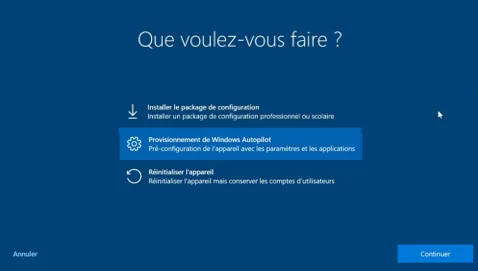

FIELD PRACTICE
Mass Workstation Deployment — 264 Dell Devices
Certified data erasure, Sysprep imaging, and zero-touch Autopilot — 264 Dell devices deployed at MIDRANGE GROUP.
Context
At MIDRANGE GROUP (Alternative Partner Solutions team), I owned the deployment of two device fleets for a client rollout: 64 Dell Optiplex desktop PCs for on-site staff and 200 Dell Latitude laptops for field users.
The two fleets required completely different workflows: the Optiplex machines were repurposed hardware that needed certified wiping before reuse, while the Latitude laptops were brand-new units destined for zero-touch remote deployment via Windows Autopilot.
Technical challenges
- Repurposed hardware must be certified-erased before re-enrollment — a simple format is not sufficient for compliance. Required: traceable erasure standard (NIST 800-88) with per-device certificates.
- Sysprep imaging requires a stable golden image: drivers, Windows updates, and corporate apps must all be baked in before capturing. Any delta after capture means a new image cycle.
- Windows Autopilot requires hardware hashes to be pre-registered in Intune before the device is powered on. On new Dell hardware without ProDeploy, Dell ImageAssist is the fastest hash capture path.
- Intune deployment profiles, BitLocker policies, Defender configuration, and update rings must all be validated on a test device before rolling out to 200 machines.
- Staggered deployment (20–30 devices/day) to catch Intune policy failures before they affect the full fleet.
How it was done — 3 phases
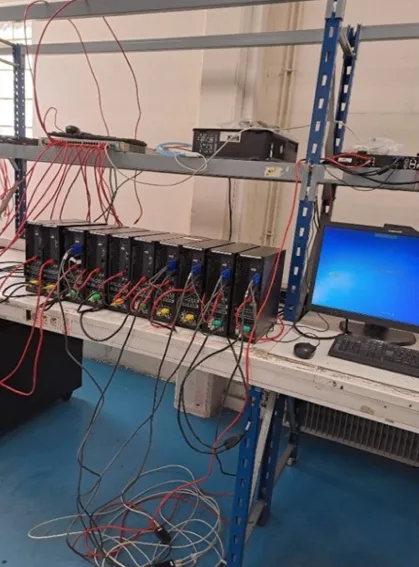
- 1Phase 1 — Blancco data erasure (64 Dell Optiplex)Each repurposed Optiplex was booted from a Blancco USB key. An erasure task was created (NIST 800-88 standard), all disks selected, and erasure launched. Blancco overwrites every sector and verifies. A tamper-proof PDF compliance certificate is auto-generated per machine. All 64 machines ran overnight in parallel — 2 to 3 hours each depending on disk size.
- 2Phase 2 — Sysprep golden image (64 Dell Optiplex)A reference Optiplex was fully configured: Windows 11, latest drivers, corporate app suite, domain join settings. Sysprep was run (/oobe /generalize /shutdown) to prepare the image for deployment. A WinPE USB key was used to boot and capture the image with DISM (dism /Capture-Image). The resulting .wim file was deployed to all 63 remaining Optiplex machines via the same WinPE environment (dism /Apply-Image). Each machine then completed OOBE and joined the domain.
- 3Phase 3 — Windows Autopilot via Dell ImageAssist (200 Dell Latitude)Each new Latitude was booted from a Dell ImageAssist USB key. ImageAssist automatically applied the deployment profile, pulled a fresh Windows image from the cloud, captured the hardware hash, and uploaded it to the Intune tenant. The machine rebooted into a clean, pre-registered OOBE. Users then only needed to enter their corporate email — Azure AD authenticated them, the Autopilot profile downloaded, and Intune silently pushed policies and apps in the background. Total IT intervention per Latitude after initial setup: under 5 minutes.
Impact
264 devices deployed on schedule with zero compliance gaps — certified erasure for all repurposed hardware, under 5 minutes of IT time per new device.
Key figures
264
Devices deployed
64 Optiplex (Sysprep) + 200 Latitude (Autopilot)
64
Blancco certificates
One per wiped Optiplex — NIST 800-88 compliant
< 5 min
IT time per Latitude
After Intune profile and ImageAssist setup
200
Zero-touch Autopilot
No physical IT at user desks
Best Practices
- Blancco and Autopilot are complementary, not competing tools: Blancco handles the compliance layer for repurposed hardware, Autopilot handles the zero-touch provisioning layer for new hardware.
- Dell ImageAssist significantly reduces Autopilot setup time on large Dell orders: no need to run PowerShell per device, no pre-enrollment requirement.
- Sysprep golden images must be rebuilt for each hardware model — drivers are hardware-specific. A single image covering all Optiplex SKUs requires careful driver injection.
- Staggering Autopilot rollouts (batch of 20–30/day) is critical: it surfaces Intune policy failures early, before they affect hundreds of users.
- Generating Blancco certificates at the time of erasure (not retroactively) is the only way to guarantee an unbroken chain of custody for compliance audits.
Tools & references
Screenshots