Cloud Backup Supervision with Acronis Cyber Backup

Acronis Cyber Backup · Acronis Cyber Protect Cloud · MIDRANGE GROUP
Context
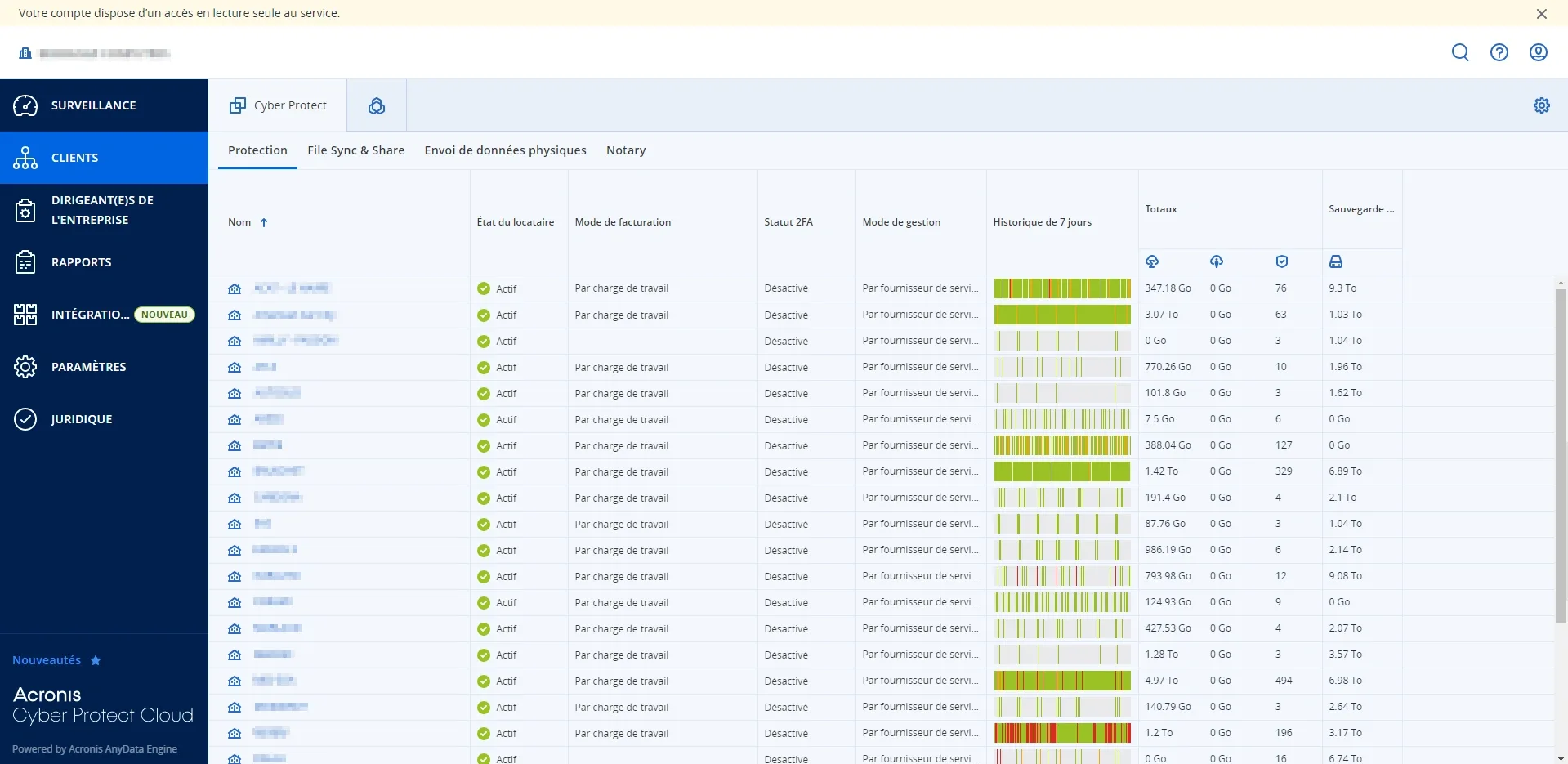
At MIDRANGE GROUP (a French IT services / MSP firm), within the Operations team alongside Théo KACEL (Systems & Network Administrator), I owned the daily monitoring of cloud and local backups for a managed client. The backup infrastructure relied on two distinct Acronis products: Acronis Cyber Backup (local/NAS backup solution) and Acronis Cyber Protect Cloud (MSP-oriented cloud backup platform). My mandate: check the Acronis dashboard daily, triage active alerts, and restore backup continuity on every failure detected.
Backup Infrastructure
- Local backup tool
- Acronis Cyber Backup (NAS / private cloud)
- Cloud backup tool
- Acronis Cyber Protect Cloud (Acronis-hosted)
- NAS destination 1
- smb://10.20.30.11/backups — 8.77 Tio / 10.5 Tio
- NAS destination 2
- smb://10.20.30.11/backups-new — 9.57 Tio / 10.5 Tio
- Cloud destination
- Acronis cloud — 139 Gio / 250 Gio
- Protected devices
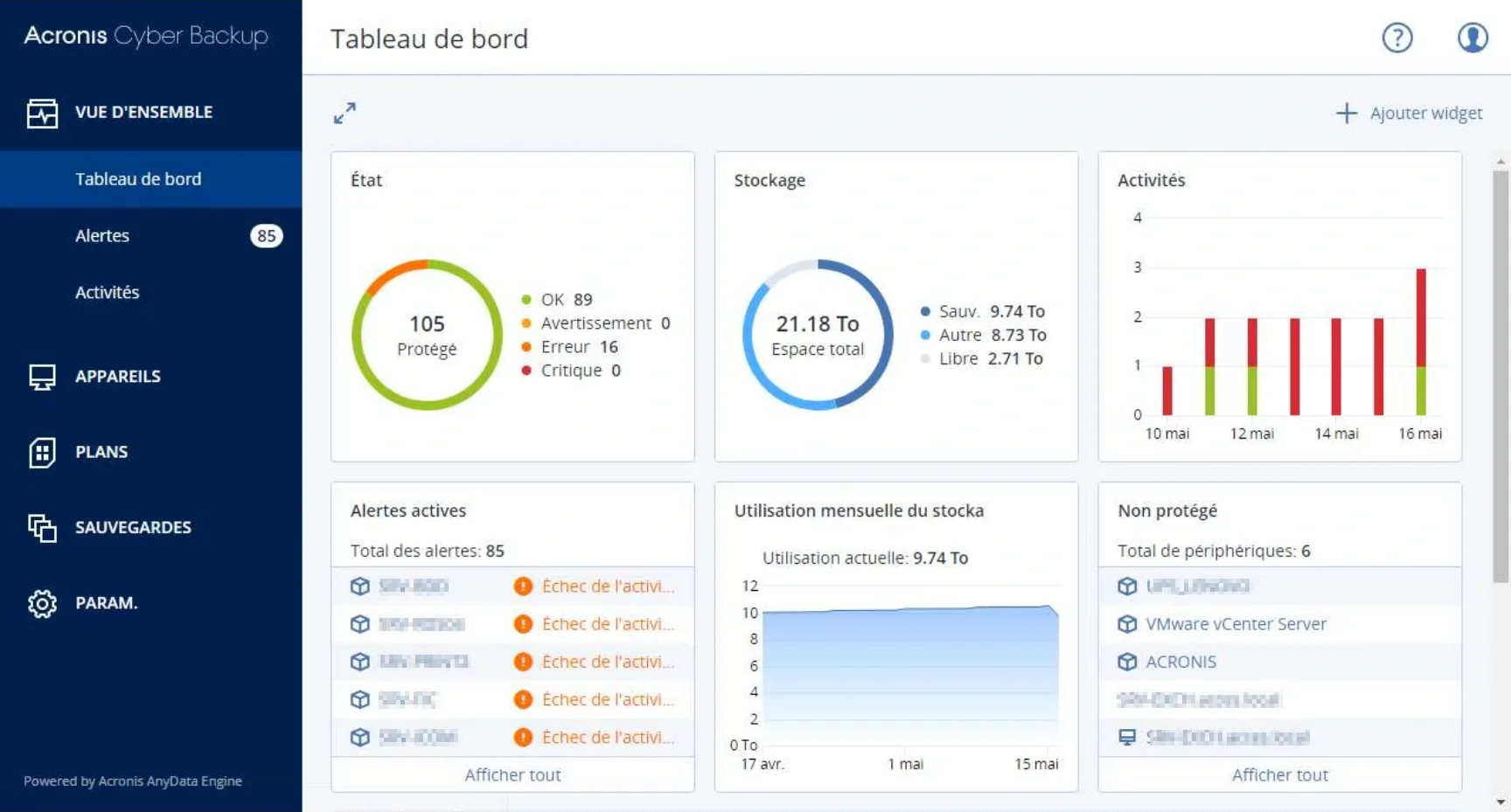
- 105 total (89 OK, 16 errors, 0 critical)
- Unprotected devices
- 6 (UPS_LENOVO, VMware vCenter Server, ACRONIS, SRV-EXCH)
- Total storage used
- 9.74 Tio backup / 21.18 Tio total
Backup Plans
The client had 5 active backup plans configured in Acronis Cyber Backup: 'Toutes les VM' (all VMs — 16 devices including SRV-RDS04, SRV-BDD, SRV-PRINT2 and 13 others — scheduled Mon–Sat at 23:00, destination: smb backups-new, retention: 2 months monthly / 4 weeks weekly / 6 days daily); 'TMP-BDD' (1 device); 'SQL-CLOUD 2' (86 devices, Mon–Fri at 23:00); 'SQL-CLOUD' (86 devices); 'Bases_Exchange' (2 devices, daily at 03:00).
Alert Investigation & Resolution
The dashboard showed 85 active alerts: 33 activity failures and 52 warnings. I investigated each case to identify the root cause and apply the appropriate fix. The most common failure scenarios encountered were: (1) NAS storage full at 75%+ — requiring deletion of old full backups to free capacity; (2) server offline or unplugged at backup time — resolved by rescheduling or confirming server availability; (3) corrupted backup plan — requiring recreation of the plan under a new name (same base name + incremented suffix) while keeping the same backup policy; (4) network issue (defective cable or saturated NAS) — causing transfer failures mid-backup.
Example Alerts (from dashboard)
- SRV-RDS04 warning
- VM backup succeeded with warning: CBT disabled — backup ran without Changed Block Tracking (VMware snapshots present)
- SRV-BDD.acces.local error
- Replication failed — client cloud account storage quota exceeded, new backups will fail
- SQL-CLOUD 2 plan
- 86 devices backed up, Bases_Exchange plan shows red (failure) — investigated network/NAS saturation
Impact
Backup continuity restored across all 105 protected endpoints, with no data loss and no recurring manual intervention once root causes were fixed.
Outcomes
- Daily monitoring
- Systematic review of backup health across 100+ devices every morning
- Failure resolution
- Root-cause analysis of 85 alerts — storage, network, server availability, and plan corruption
- Plan management
- Corrupted backup plans recreated without data loss, continuity restored
- Storage management
- NAS capacity freed by purging obsolete full backups, preventing future failures
- Skills
- Acronis Cyber Backup, Acronis Cyber Protect Cloud, backup plan management, NAS storage, alert triage
Screenshots